

If you want to know how to get cited in AI Overviews, start with an uncomfortable fact: a strong ranking for the main keyword no longer guarantees a link in the AI answer above it. Google builds AI Overviews by running several related searches behind the scenes, then citing the passages that answer each part of the question best.
That changes the job. You are no longer optimizing one page for one query; you are making specific passages easy to find, easy to extract and easy to trust. This technical AEO checklist covers what Google says it requires, the six steps we use to make pages citable, and how to measure AI Overview visibility now that Search Console reports it directly.
Why Ranking Alone Does Not Get You Cited
AI Overviews are built from more than the results for the query someone typed. Google says its AI features may issue multiple related searches across subtopics and data sources, a process it calls query fan-out, and then show a wider and more diverse set of links than classic search. A page can rank first and still lose the citation to a page that answers one sub-question more directly.
Google’s own AI features and your website documentation describes this directly: AI Overviews and AI Mode may use “issuing multiple related searches across subtopics and data sources” to develop a response, which lets them display “a wider and more diverse set of helpful links.” Because the two features can use different models and techniques, the links in AI Mode and AI Overviews also differ for the same query.
Being cited also does not mean being clicked. A citation earns visibility at the moment of the answer, and that is increasingly where the decision happens:
- In the Pew Research Center study of Google users and AI summaries, people clicked a traditional search result on 8% of visits that showed an AI summary, versus 15% of visits without one.
- Only 1% of visits to a page with an AI summary included a click on a link inside the summary itself.
- 26% of visits with an AI summary ended the browsing session, compared with 16% without one.
So the goal is twofold: be one of the sources the summary is built from, and make the cited passage specific enough that the reader wants the rest of your page.
What Google Says It Takes to Appear in AI Overviews
Google’s stated requirement is short: the page must be indexed and eligible to be shown in Google Search with a snippet. There is no separate application, no special schema.org type and no AI-specific file to add. Everything else is standard SEO done well, which is why technical hygiene and passage quality decide who gets cited.
The same documentation is explicit on three points that save teams a lot of wasted effort:
- No special optimization. Google says there are no additional requirements to appear in AI Overviews or AI Mode, “nor other special optimizations necessary.”
- No special markup. “There’s also no special schema.org structured data that you need to add.” New machine-readable files or AI text files are not required either.
- Standard reporting. Traffic from AI features is included in the Performance report in Search Console under the Web search type, not in a separate bucket.
Google’s listed best practices are the ones you would expect: allow crawling in robots.txt and in your CDN or hosting layer, make content findable through internal links, provide a good page experience, put important content in text, support it with relevant images and video, and keep Merchant Center and Business Profile data current.
How to Get Cited in AI Overviews: The 6-Step Technical Checklist
To get cited in AI Overviews, make sure the page is eligible for a snippet, map the sub-questions Google is likely to fan out to, answer each one in a self-contained 40-60 word passage, present facts in tables and lists with sources, keep structured data consistent with visible text, and corroborate your brand and authors across the web.
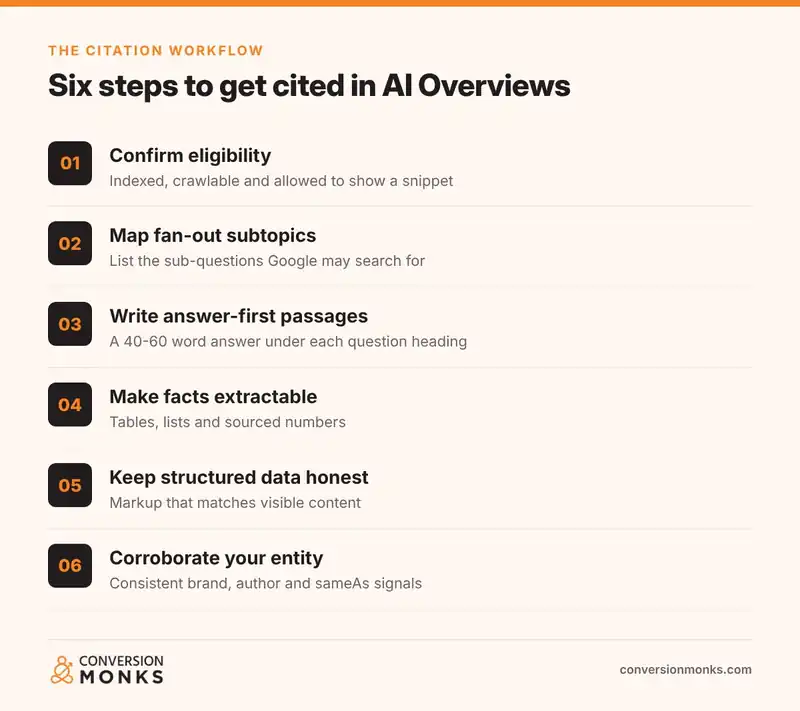
Step 1: Confirm the page is eligible for a snippet
Eligibility failures are silent. A page that is noindexed, blocked by a CDN bot rule or carrying a page-wide nosnippet cannot be a supporting link, however good the content is. Check these before you edit a word:
- Run URL Inspection in Search Console and confirm “URL is on Google” and that Googlebot can fetch the live page.
- Check the rendered HTML for
noindex,nosnippetor a lowmax-snippetvalue in the robots meta tag or the X-Robots-Tag header. - Confirm your firewall or CDN is not challenging Googlebot. Google’s documentation specifically calls out allowing crawling “by any CDN or hosting infrastructure.”
- Make sure the answer itself is in the HTML text, not only inside an image, a PDF or a script-loaded tab.
Step 2: Map the fan-out subtopics
Because AI Overviews search across subtopics, list the sub-questions behind your main query before you write. For a query like “how to get cited in AI Overviews”, the fan-out likely includes eligibility, schema, content format, measurement and opt-out controls. Each of those deserves its own clearly labeled section.
Practical sources for the list:
- People Also Ask boxes and related searches for the main keyword and two or three close variants.
- Search Console queries for the page (Performance, filtered by page), especially longer question-form queries.
- Sales and support questions your team hears, which often match the follow-up questions AI Mode asks.
Step 3: Write answer-first passages
Put the answer directly under a heading phrased the way people ask it. The U.S. government’s plain language web writing tips on Digital.gov give the rule in one line: “Put the most important information first, followed by the details.” The same guidance recommends simple, descriptive headings and no more than 5-7 lines per paragraph.
Its guide to organizing information adds a useful ordering principle for long pages: general first, with exceptions, conditions and specialized information later. In practice, each section should follow the same pattern:
H2/H3:  A question or task, phrased as searched
Answer: 40-60 words that stand alone without the rest of the page
Depth:  Steps, settings paths, examples, a table or a code block
Proof:  A named source with a link for every number or claim
A self-contained answer matters because the passage may be read without the paragraphs around it. Avoid openers like “As mentioned above” or “It depends” in the first sentence of a section.
Step 4: Make facts extractable
Generative systems lean on content they can lift and verify. Research from the paper GEO: Generative Engine Optimization found that content changes such as adding sources and statistics could increase visibility in generative engine responses by up to 40%, with results varying by domain. For your pages, that translates into a few habits:
- Put comparisons and specifications in an HTML table, not an image.
- Use numbered lists for procedures and include the exact UI path, for example Settings > Privacy > Preview controls.
- State numbers with the source, the date and a link in the same sentence.
- Define terms in one sentence the first time they appear.
Step 5: Keep structured data honest
Structured data does not unlock AI Overviews, but it helps Google understand the page, the author and the organization behind it. The rule that matters most is in Google’s general structured data guidelines: “Don’t mark up content that is not visible to readers of the page.” Markup must be a true representation of the page.
For most articles, an Article graph that connects the page, author and organization is enough:
<script type="application/ld+json">
{
  "@context": "https://schema.org",
  "@graph": [
    {
      "@type": "Organization",
      "@id": "https://example.com/#organization",
      "name": "Example Co",
      "url": "https://example.com/",
      "sameAs": ["https://www.linkedin.com/company/example-co"]
    },
    {
      "@type": "Person",
      "@id": "https://example.com/about/#jane-doe",
      "name": "Jane Doe",
      "jobTitle": "Head of SEO",
      "worksFor": { "@id": "https://example.com/#organization" }
    },
    {
      "@type": "Article",
      "headline": "How to Get Cited in Google AI Overviews",
      "author": { "@id": "https://example.com/about/#jane-doe" },
      "publisher": { "@id": "https://example.com/#organization" },
      "datePublished": "2026-11-05",
      "dateModified": "2026-11-05"
    }
  ]
}
</script>
One change to plan around: according to Google’s FAQPage structured data documentation, FAQ rich results stopped appearing in Google Search on May 7, 2026. FAQ markup can stay on the page, but it no longer produces a visible rich result, so the value of an FAQ section now comes from the clear, quotable answers in the visible text.
Step 6: Corroborate your entity and authors
AI answers favor sources whose identity is easy to confirm. Use the same organization name, description and logo everywhere, link your official profiles through sameAs, and give every article a named author with a bio page that states their experience. When third-party sites describe you the same way your site does, your passages are easier to trust and attribute.
The same work helps outside Google. Our guide to ranking your website in ChatGPT search covers how these entity signals carry over to other AI answer engines.
How to Measure AI Overview Citations in Search Console
Use the Generative AI performance report in Search Console. It shows how often links to your site appeared in AI Overviews and AI Mode, by page, country, device and date. Google says the report rolled out to all websites worldwide as of August 31, 2026. It reports impressions, not clicks; clicks stay in the main Performance report.
Per Google’s Generative AI performance report help page, you will find it with the other Performance reports in Search Console. It may not appear for sites with too few generative AI impressions. A practical weekly routine:
| Question | Where to look | What to do with it |
|---|---|---|
| Which pages are cited most? | Generative AI report, Pages dimension | Protect them: keep facts current and dates updated |
| Which important pages are missing? | Compare Pages against your priority URL list | Run Steps 1 to 4 on those pages first |
| Is visibility growing? | Dates dimension, week over week | Annotate content updates to see what moved the line |
| Where does it come from? | Countries and Devices dimensions | Check mobile layout if mobile dominates |
| Are clicks following? | Performance report, Web search type, same pages | Strengthen the next step after the cited passage |
Measurement closes the loop on how to get cited in AI Overviews: rewrite a section, wait for recrawl, then check whether the page’s generative AI impressions move. The report also has a search type filter that separates text-based queries from multimodal searches such as Google Lens and Circle to Search. If you sell physical products, check both.
Preview Controls: When to Limit What AI Overviews Show
You can limit what Google shows from a page with nosnippet, data-nosnippet, max-snippet or noindex. These same controls apply to AI Overviews and AI Mode. Use them sparingly: any text excluded from snippets also cannot be used as a cited passage, so blocking content usually costs more visibility than it protects.
Google’s robots meta tag and data-nosnippet specification documents each control. Reasonable uses include:
- data-nosnippet on a short block of gated or licensed text inside an otherwise public page.
- max-snippet when contracts limit how much of a passage can be quoted.
- noindex for thin utility pages, which also keeps them out of AI features entirely.
Google notes that changes take effect only after recrawling, which can take anywhere from several days to several months. Use URL Inspection to confirm Googlebot sees the control.
Common Mistakes That Keep Pages Out of AI Overviews
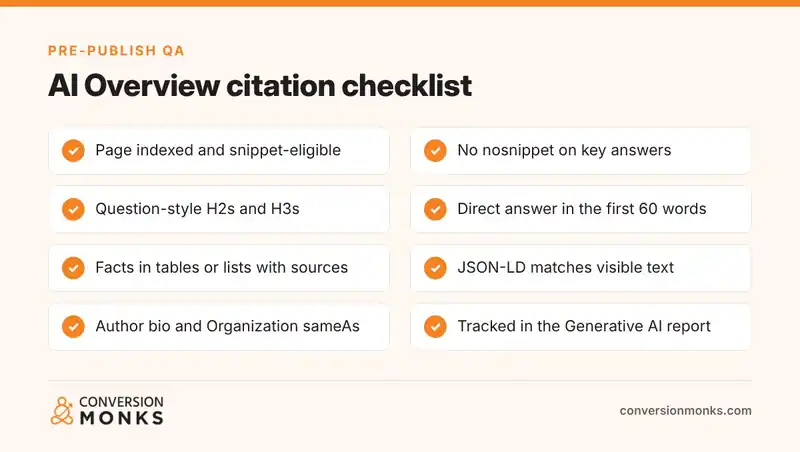
Most pages that never get cited fail for ordinary reasons: the answer is buried under an introduction, facts sit inside images, headings describe the brand instead of the question, or a technical control quietly blocks snippets. Much of how to get cited in AI Overviews is simply removing these blockers before investing in more content.
- Throat-clearing intros. Three paragraphs of context before the answer pushes the citable passage down the page.
- Clever headings. “The secret sauce” tells neither a reader nor a retrieval system what the section answers.
- Unsourced numbers. Statistics without a named source are harder to trust and to quote.
- Schema that does not match the page. Marked-up FAQs or reviews that readers cannot see break Google’s guidelines.
- One giant page. Covering ten loosely related topics on one URL makes each passage weaker. Split distinct tasks into separate pages and link them.
If you publish often, add these checks to your editorial QA. Our blog post publishing checklist is a good place to slot them in.
Frequently Asked Questions
How do I get my website cited in AI Overviews?
Make sure the page is indexed and eligible for a snippet, then answer each likely sub-question in a short, self-contained passage under a clear heading. Support answers with tables, lists and sourced facts, keep structured data consistent with the visible text, and use consistent brand and author information across the web.
Does schema markup help with AI Overviews?
Google says no special schema.org structured data is required to appear in AI Overviews. Structured data still helps Google understand the page, author and organization, but it must match visible content. It supports good pages; it does not replace clear, well-sourced answers in the text.
Do AI Overviews only cite top-ranking pages?
No. Google says AI Overviews may run multiple related searches across subtopics, a process called query fan-out, and can show a wider and more diverse set of links than classic search. A page can be cited for a sub-question even when it does not rank first for the main query.
How long should an answer be for AI Overviews?
Aim for a direct answer of about 40 to 60 words placed immediately under the heading, followed by details such as steps, examples or a table. The short answer should make sense on its own, because it may be read without the surrounding paragraphs.
Can you opt out of AI Overviews?
You can limit what Google shows from your pages with nosnippet, data-nosnippet, max-snippet or noindex, and these controls apply to AI Overviews and AI Mode. Content excluded this way also cannot be used as a cited passage, so most sites apply them only to specific sensitive text.
How do I track AI Overview citations?
Use the Generative AI performance report in Search Console. It shows impressions for links to your site in AI Overviews and AI Mode, broken down by page, country, device and date. Google rolled it out to all websites as of August 31, 2026. Clicks remain in the main Performance report.
Want a page-by-page review of which of your URLs are eligible, which are being cited and what to fix first? Conversion Monks runs AEO audits as part of our SEO services. Contact us to book an AI Overview visibility review.
Written by Neha Verma, co-founder of Conversion Monks.